ComAsNas
Coming soonComAsNas Assistant, powered by Claude (Anthropic)

Mac · Windows → iPhone · iPad

Your computer's folders, right in the Files app

ComAsNas turns your Mac or Windows PC into a personal NAS. Pick folders on your computer and they appear in the Files app on your iPhone and iPad. Your files stay on your computer; nothing is uploaded to a cloud.

Available now, free, no account — macOS 14+ (signed and notarized by Apple) and Windows 10/11. The iPhone and iPad app is coming to the App Store.

2
desktop apps available nowmacOS · Windows
1
iPhone & iPad appcoming to the App Store
0
files stored on our serversyour files stay on your computer
  • No uploadsFiles stay on your computer
  • No accountNo name, no email
  • Encrypted relayEnd to end; it can't read your files
  • Mac & WindowsUp to 5 computers

How it works

Set up in three steps

Install, choose your folders, scan one QR code. From then on, just open your files from the Files app.

Illustration — you choose exactly which folders to share.
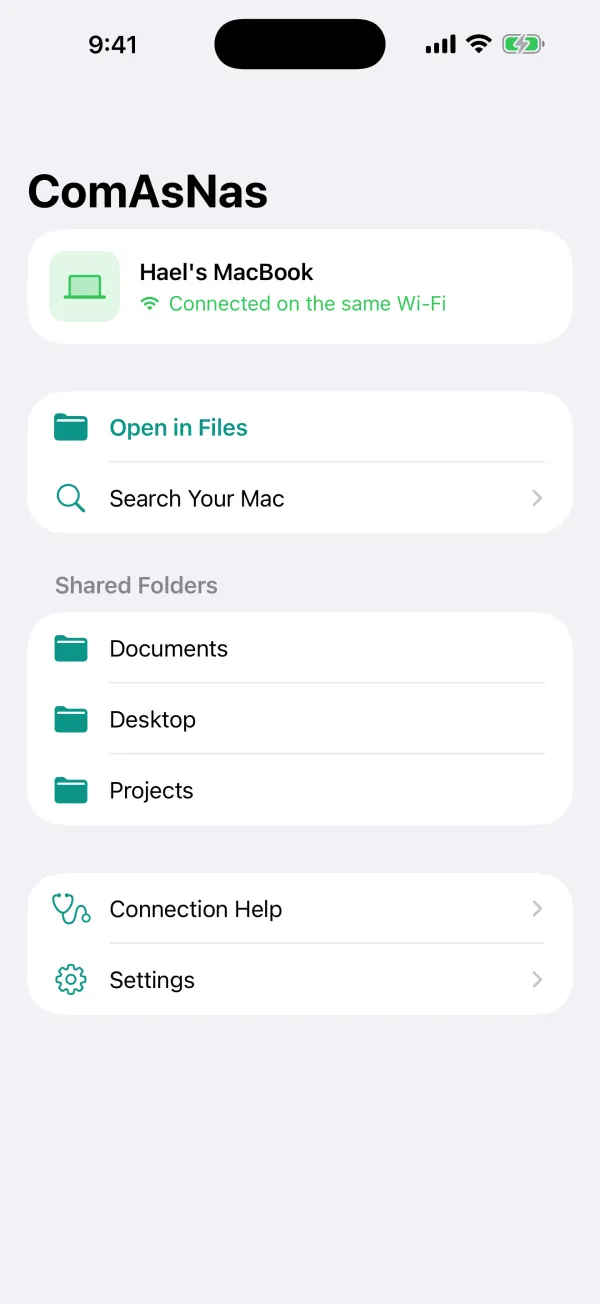
ComAsNas iPhone app home screen: Hael's MacBook connected on the same Wi‑Fi, with shared folders Documents, Desktop and Projects
The real iPhone app (demo data)
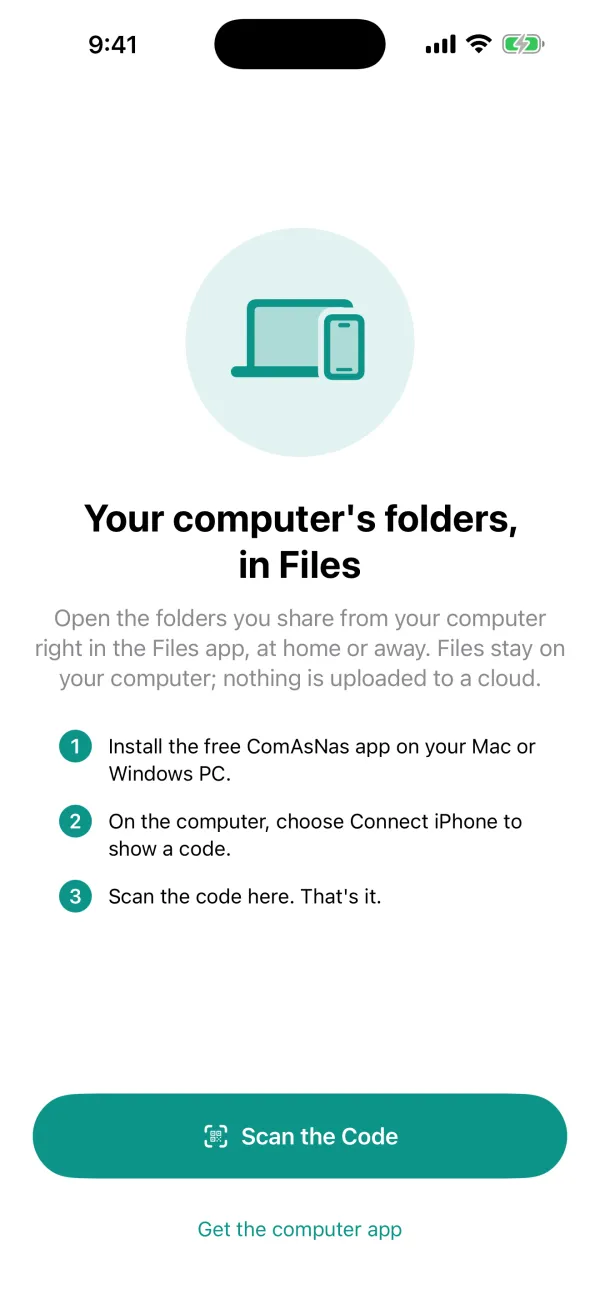
ComAsNas iPhone app first-run screen: three steps to pair by scanning the QR code shown on the computer
The real iPhone app — first pairing

Try it

Feels like Files. Finds its own way.

Your computer shows up as a location in Files, and files come down only when you open them. The connection picks the best route wherever you are.

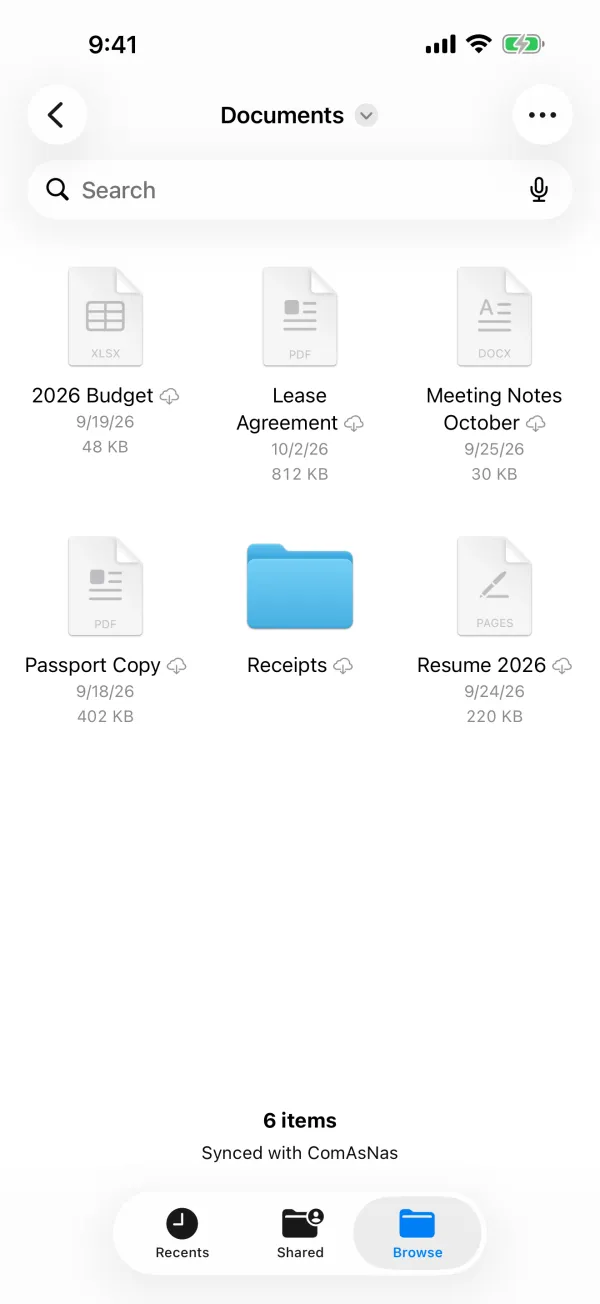
Browse your folders

Open a folder, then tap a file.

Locations · ComAsNas

MacBook

Synced with ComAsNas

Interactive illustration — not the real app; file names are examples.

How it connects

Same app, same folders, wherever you are.

Home · office Relay relay.comasnas.com Your computer iPhone Internet

Same Wi‑Fi

On the same network, at home or at the office, your iPhone talks to your computer directly.

Away · direct

You don't need to share a Wi‑Fi network. If your home router allows it, your iPhone connects straight to your computer from anywhere.

Away · relay

When a direct connection isn't possible, traffic goes through an end-to-end encrypted relay. The relay can't read your files and doesn't store them. It's free at launch, with a daily usage limit.

Features

Away from home, your files stay at home

No uploads

Files stay on your computer. Your iPhone fetches only what you open.

Works away from home

Direct when your router allows it, otherwise through an end-to-end encrypted relay.

Right in Files

Open and save from any app. Your computer becomes just another location.

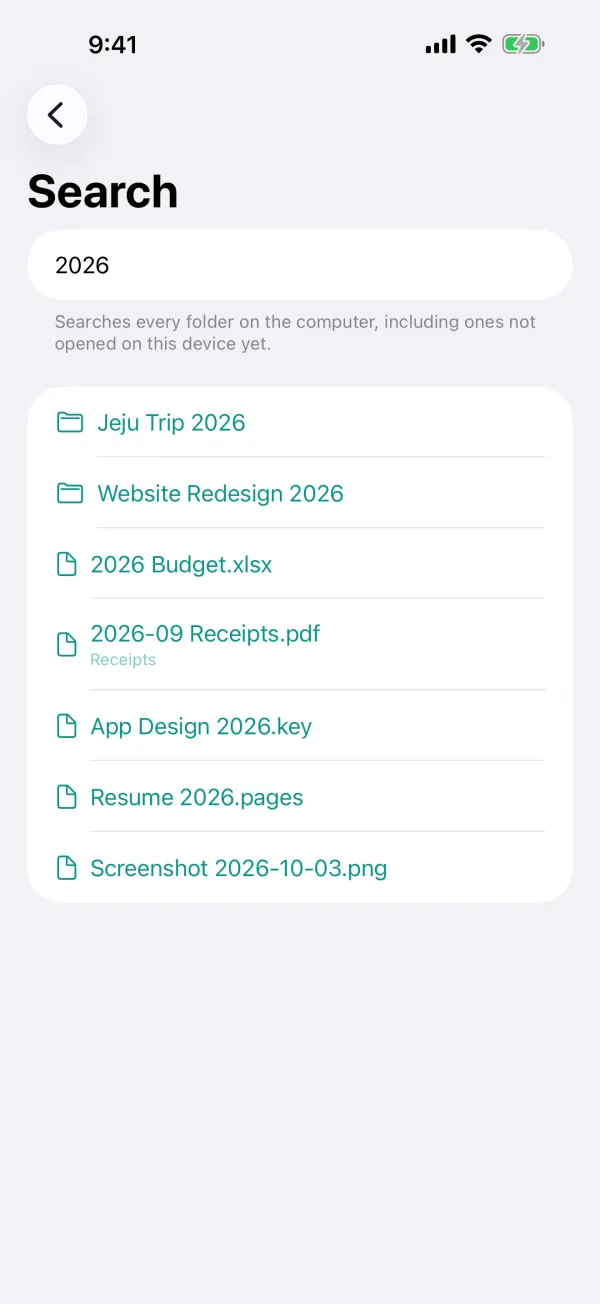
Search your Mac

Find files on your Mac from your iPhone.

Safe with two editors

Edited the same file on two devices at once? You won't lose either change.

One scan, no sign-up

Pair with a single QR code. Connect up to five computers.

The iPhone app

Small, quiet, and clear

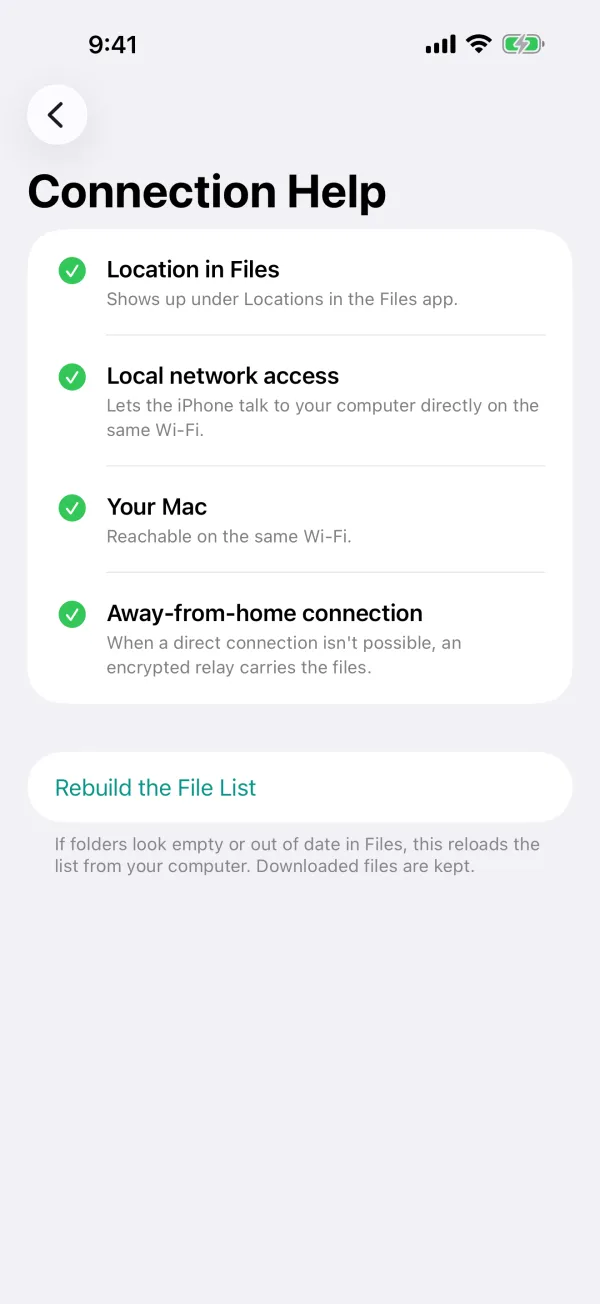
It shows whether you're connected and tells you exactly what's in the way when something isn't working. Everything else happens in Files.

AI · Coming soon

A preview of AI features

Two features we're building now. Neither is released yet; we'll announce them here and in the app when they're ready.

ComAsNas Assistant Coming soon

Powered by Claude (Anthropic)

Hand the files on your own computer to Claude. Ask about them, tidy them up, or find them with a sentence.

  • Ask about your filesAsk something like "What are the termination terms in this contract?" The answer lists the files it used.
  • Organize and renameClaude proposes a plan, and nothing changes until you approve it. Anything removed goes to the Trash.
  • Smart searchFind files with an everyday sentence, like "the lease PDF I got last month."

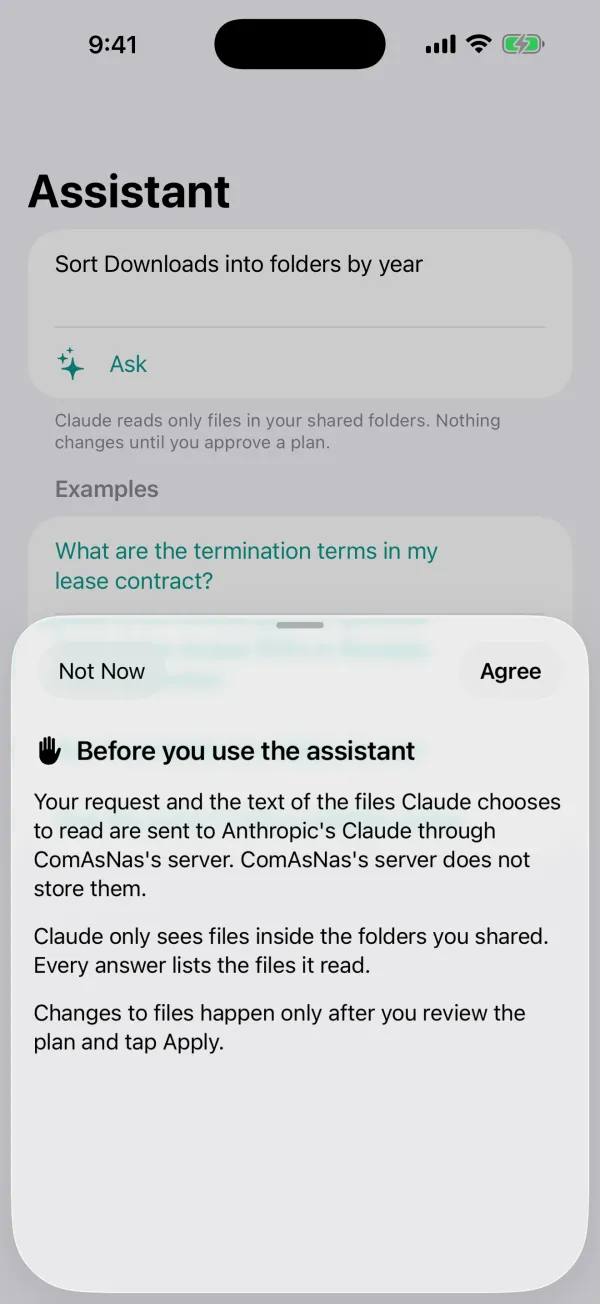
Your request and the text of the files Claude reads go to Anthropic's Claude through ComAsNas's server, which doesn't store them. Smart search sends only the sentence you type.
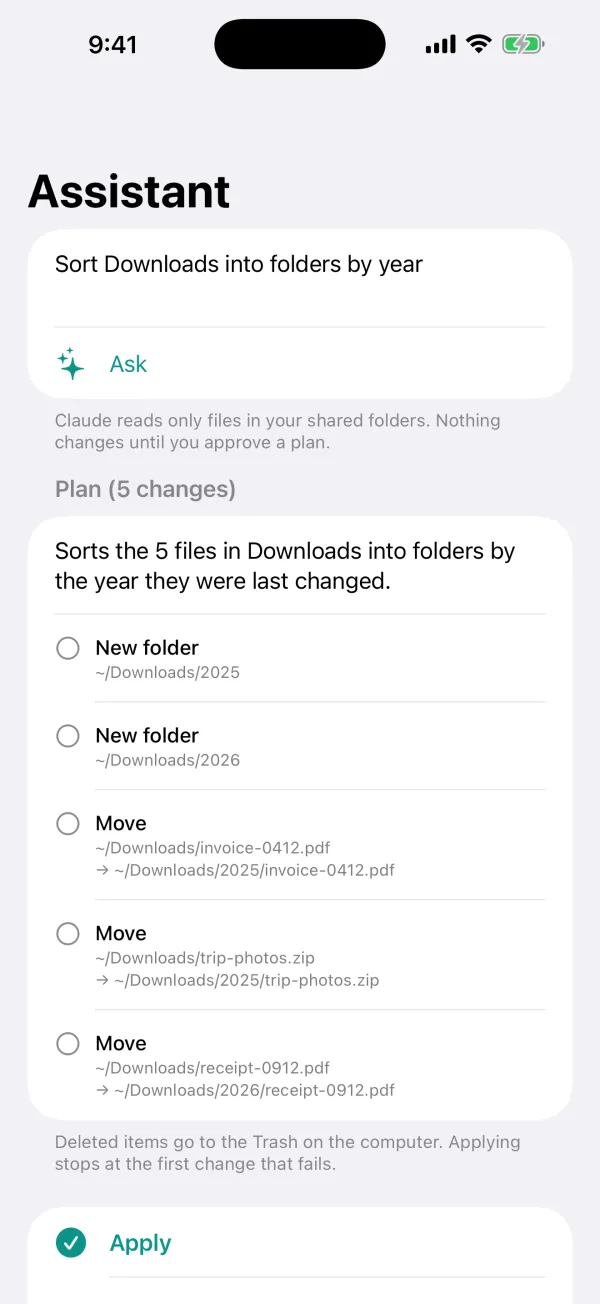
  • Assistant plan screen: five changes that move files in Downloads into folders by year, with an Apply button

    Plan — nothing changes until you approve
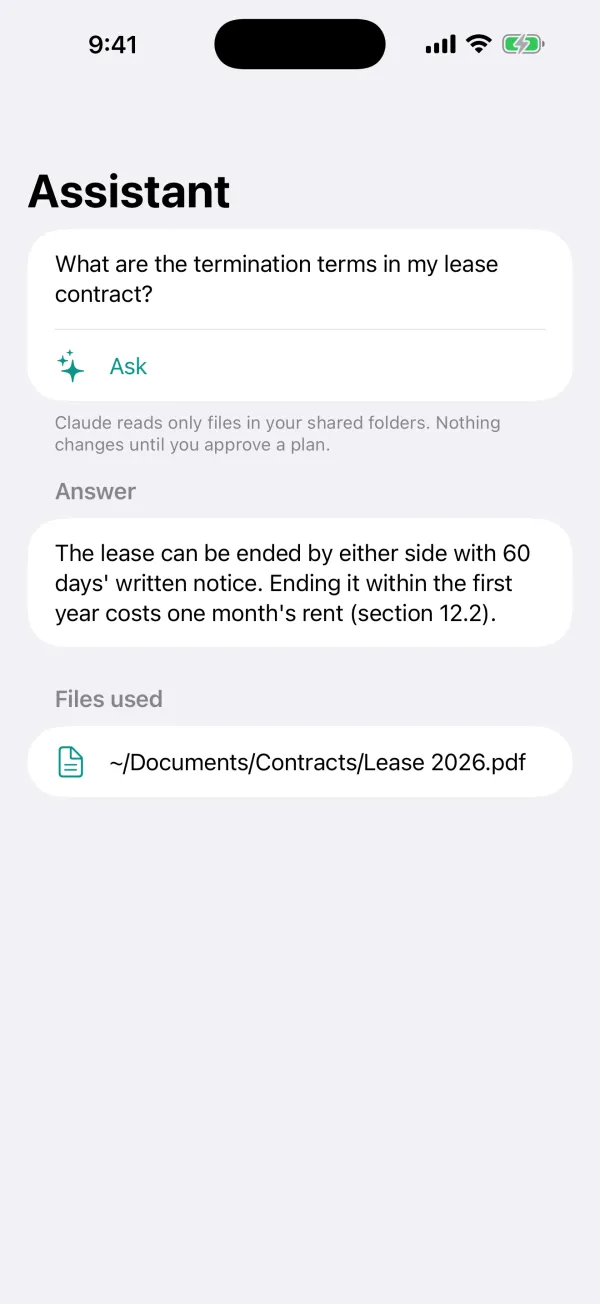
  • Assistant answer screen: the termination terms of a lease, with the file used, Lease 2026.pdf

    Answer — with the files used

  • Assistant consent sheet: your request and the text of files Claude reads go to Anthropic's Claude through ComAsNas's server, which does not store them

    Privacy notice before first use

Preview build with sample data — not released yet

Connect an AI agent to your computer Coming soon

Paste one prompt into a cloud AI session such as Claude Code or Codex, and the agent can read and write files in the folders you share. If you allow it, it can also run commands. It connects through the same end-to-end encrypted relay as your iPhone, and you can cut it off at any time.

  1. "Connect a cloud session…" in the menu barChoose permissions and how long it lasts, then copy the prompt.
  2. Paste it into the sessionThe agent runs one command and pairs with your computer.
  3. Work in your own foldersThe agent reads, edits and saves files in your shared folders.

Read the Claude Code & Codex guide →

Recorded run · 2026-10-08 · preview build (not released)
# Real run, 2026-10-08, preview build: CLI on one machine -> production relay (relay.comasnas.com) -> test ComAsNas agent.
# Outputs are verbatim except: long temp paths shortened to ~/Shared, and the long invite string shortened.
$ npx comasnas connect comasnas-connect-v1:eyJjb2RlIjoi…
ComAsNas: this session is connected to the user's own computer "MacBook Air" (mac).
The `comasnas` command reaches it through the ComAsNas relay (end-to-end encrypted). The user
chose to share these folders; nothing outside them is reachable:
  ~/Shared  (shared)
Access: files read + write; commands ON (sandboxed: writes only inside the shared folders and temp); connection expires 2026-10-09 01:29 UTC.
$ comasnas ls -l ~/Shared/proj
file       19 B  2026-10-08 01:29  readme.txt
$ comasnas cat ~/Shared/proj/readme.txt
hello from the mac
$ comasnas put ./big.bin ~/Shared/proj/big.bin
~/Shared/proj/big.bin (8.6 MB)
$ comasnas get ~/Shared/proj/big.bin ./big.back && cmp big.bin big.back && echo SAME
./big.back (8.6 MB)
SAME
$ comasnas rm ~/Shared/proj/big.bin
~/Shared/proj/big.bin moved to the Trash
$ comasnas cat /etc/hosts
comasnas: /etc/hosts is not inside a shared folder (symbolic links are not followed) (outside_shared_folders)
$ comasnas exec --cwd ~/Shared -- 'echo hi; for i in 1 2 3; do echo tick $i; sleep 1; done; exit 7'
hi
tick 1
tick 2
tick 3
$ echo $?
7
$ comasnas exec -- 'echo x > $HOME/.probe && echo WROTE || echo DENIED'
zsh:1: operation not permitted: /Users/…/.probe
DENIED
# (user clicks Disconnect in the ComAsNas menu bar)
$ comasnas ls ~/Shared
comasnas: the computer refused this connection (revoked or expired); ask the user for a new invite and run comasnas connect again (unauthorized)

Long temp paths are shortened to ~/Shared and the invite string is cut (see the first lines). Setup steps are in the AI agent guide.

Only your shared folders
Read and write by default, or read-only if you prefer.
Commands off by default
When you turn them on, they run in a sandbox that can't write outside your shared folders and temp folders. Mac first.
Time-limited
Connections expire after 30 days by default. Invite codes work once, for 10 minutes.
Revoke any time
Disconnect each session on its own, and stop every running command at once.
Everything is logged
Agent requests and commands are recorded in a log on your computer.
Deletes go to the Trash
Files an agent removes are moved to the Trash, never erased outright.
  • You allow relay.comasnas.com once in your cloud environment's network settings. ComAsNas doesn't work around a platform's network restrictions.
  • Claude and Claude Code are products of Anthropic; Codex is a product of OpenAI. ComAsNas is an independent app and isn't affiliated with either company.

Security & privacy

Your files live on your computer

ComAsNas doesn't ask for your name, email or an account, and uses no analytics, ads or tracking. This website makes no third-party requests either.

Read the full privacy policy

  • Nothing is uploadedFiles stay on your computer. Your iPhone fetches a file only when you open it.
  • Paired with one QR scanConnection details and device keys stay in on-device storage such as the iPhone and Mac keychain.
  • End-to-end encrypted relayThrough the relay, data is encrypted with keys only your iPhone and computer know (P‑256 key agreement + AES‑GCM). The relay can't read it and stores no files.
  • The relay handles very littleRandom tunnel and device IDs, daily usage counts, and request logs that are deleted after a few days. The privacy policy has the details.
  • Disconnect whenever you likeiPhone: Settings → Disconnect. Mac: menu bar → Settings → Devices.

Pricing & requirements

Free to use

$0Free

  • Mac, Windows, iPhone and iPad appsFree, no account
  • Same Wi‑Fi and direct connectionsFree
  • End-to-end encrypted relayFree at launch, with a daily usage limit

Requirements

Requirements
iPhone · iPadiOS 17 or later / iPadOS 17 or later
MacmacOS 14 or later
Windows PCWindows 10 version 1809 or later, Windows 11 — 64-bit (x64 or ARM64)

Connect up to five computers.

Made by

One developer, end to end

Independent developer — South Korea

ComAsNas is built and run by Hael Song, an independent developer in South Korea, who designs and builds every part — the macOS, Windows and iPhone apps and the encrypted relay — and answers support email personally.

Contact support@comasnas.com

  1. 01
    Swift & SwiftUImacOS app, iPhone & iPad app, Files integration (File Provider)
  2. 02
    .NETWindows app (x64 and ARM64)
  3. 03
    Cloudflare Workers + Durable ObjectsEnd-to-end encrypted relay
  4. 04
    Claude APIComAsNas Assistant (in testing)

FAQ

Questions

Are my files uploaded to a cloud?

No. Files stay on your computer, and your iPhone fetches them only when needed.

Does it work away from home?

Yes. It connects directly when your home router allows it, otherwise through the end-to-end encrypted relay. The relay is free at launch, with a daily usage limit.

What if my Mac goes to sleep?

A sleeping Mac can't be reached. Turn on "Prevent sleep" in the Mac app's settings to keep it awake while it's plugged in.

Does it work with Windows?

Yes, on Windows 10 version 1809 or later (64-bit, x64 or ARM64). Installers are on the download page.

I don't see it in the Files app.

In Files, go to Browse → … → Edit and turn on ComAsNas. The app's Connection Help checks this for you.

Who makes ComAsNas?

ComAsNas is built and operated by Hael Song, an independent developer. Questions, bug reports and press: support@comasnas.com.

How is Claude used?

Today, it isn't: the released apps don't use any AI. The ComAsNas Assistant and smart search are built and in testing, not released yet. The upcoming ComAsNas Assistant will use Anthropic's Claude to answer questions about your files, propose plans to organize and rename them, and turn a search sentence into a structured search. Only your request and the text of files Claude reads are sent, through ComAsNas's server, which doesn't store them.

How do I get help?

Email support@comasnas.com. A screenshot of the app's Connection Help screen helps us help you faster. See also Support.

Put your computer in your pocket

Free, no account. Install it on your computer now; the iPhone and iPad app is coming to the App Store.